I was finally able to get my presentation posted… Here’s what I talked about at ALSC06, in Pittsburgh – Blogs, Wikis, & Other Emerging Trends – Web 2.0.
For Folks Who Attended ALSC06
I’m still working on posting my powerpoint slides – they’ll appear her soon – it just might take another day or two (software issues). But until then…
A few people asked me if a Web 2.0 “best practices” in libraries existed, and a few others mentioned that my talk was useful, but was a lot to soak in. In both cases, there’s a great resource for you – Michael Stephens’ Web 2.0 and Libraries: Best Practices for Social Software, which ALA recently published as one of their Library Technology Reports.
Stephens is great – he really understands all the new web 2.0 concepts (he even has a blog at tametheweb.com), and he knows how these new tools can be used in libraries. His Web 2.0 and Libraries report includes many examples in all types of libraries – some are easy-to-do free things, others are more involved, custom-built tools.
But all are useful to read about, and I think you will learn something you didn’t know if you pick up a copy of his Report.
Making Time for Web 2.0
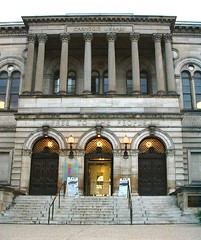 On Friday, I gave an “Introduction to Web 2.0” presentation to about 100 children’s librarians at the ALSC conference in Pittsburgh, PA. It was a blast! Attendees really seemed to appreciate the presentation (judging by the many questions and thank-you’s I received throughout the rest of the day).
I even met (and ate lunch with) Mary Ghikas, Senior Associate Executive Director at ALA (and blogger, too) … and I found out she reads my blog! Hi, Mary – it was nice to meet you!
People attending my presentation asked some great questions, including this one: “how do I have time for this new stuff” (i.e., blogs, wikis, IM, and other social networking things)? I answered the question, then realized an expanded answer would make a good blog post. So…
Question: How can I possibly have time for all this stuff?
Answer: I’ll answer in two ways – one for library administrators, and one that’s more for front-line staff (but you admins should read it, too).
For the Admins:
Library administrators and managers need to lead this change in their organizations. One way they can do this is to provide time, equipment, and training in order to successfully implement these new tools into the library’s digital space.
What does that mean, practically? Here are some examples:
Time:
- Time to play and experiment
- time to read about new tools and technologies
- time to read blogs, wikis, to IM with colleagues, etc.
- time to do the actual work – time to post to blogs, record and edit podcasts and videoblogs, time to take photographs and manipulate them in graphics editing programs, etc.
Equipment:
- Software and tools – blog and wiki applications, audio editing software, etc.
- the ability to download software from the web (some library IT staff don’t allow non-IT staff to download things)
- digital cameras, microphones, digital camcorders, etc.
- Do you want your customers to have mobile access to your services? Then yo need to provide cell phones with wifi/web aaccess to at least some of your staff, so they can successfully build and test mobile services
Training:
- Sending staff to formal training in basic video production, audio editing, or how to write for the web
- Practical training for front-line staff. Instead of teaching a class on RSS, for example, teach a class on what YOUR library’s RSS feed is, what information it has, and how to drop that feed into popular services like BLoglines and My Yahoo. This way, when patrons ask about the library’s RSS services, your staff will be ready.
- Same thing with iPods – if you want to start an iPod program, train staff to download ebooks to iPods and to use iTunes, so they’ll be ready to help patrons.
- And buy books. Lots and lots of “how to” books.
For Front-Line Staff:
When I hear librarians say “how do you find the time to do these things,” they tend to be saying one of about three things:
1. “I don’t want to learn new stuff” or “it’s going to take a LOT of time to learn new stuff – how will I get the REST of my job done?” To that, I always go back to the library’s patrons, what they’re doing, and what they’re expecting.
For example, in my session at ALSC, I asked attendees (mostly children’s librarians) if their patrons (i.e., kids) were IM’ing. They started laughing, because so many of their young patrons were obviously using IM. Then I asked them “so, how many of YOU are using IM?” The laughter died down pretty fast (because the majority had never used IM). Then I was able to drive home the point that we need to continue learning new media (thankfully mentioned in the presentation before mine). You have to make it part of your job – talk to your managers and figure out the specifics of how to do this!
2. “We don’t have enough staff to do these new things.” When I hear this excuse (because that’s really what it is), I think back to the NEKLS Technology Day I attended. I was on a discussion panel with a librarian at a small library. She is the ONLY staff member at her library, and yet she has time for a library blog and console gaming nights.
If a one-librarian library can do these things, then you can, too. Sometimes it’s not really a staffing change that’s needed; instead, a mental change, or a change in focus, is what’s needed.
3. “We don’t have admin support to do these things.” Sometimes, administrators and library boards, for one reason or another, haven’t yet embraced newer trends. Usually, it’s because they don’t fully understand those newer trends.
So… it’s YOUR job as a staff member to educate them! But when you attempt that, think results-oriented education, meaning what will the result be if we do this?
Also educate in terms of real needs, even if it means staffing changes. For example, if your library suddenly had 200 teens mobbing the reference with in-depth questions every day, what would you do? Most likely,you’d realize a trend was afoot, and respond my moving staff around to meet the new need.
It should be the same in your library’s digital space.
Libraries aren’t the Only Ones Dealing with Web 2.0
We’ve beenseeing a few “web 2.0-ish” library jobs crop up lately – look at this job someone just accepted at NPR:
“…serving as senior product manager for online communities. In this role, I’ll essentially act as NPR’s Web 2.0 strategist, helping them develop new initiatives that encourage greater public involvement in NPR’s online activities. These activities could take a variety of forms: online social networks, wikis, blogs, mobcasting, citizen journalism, original content sharing. The NPR digital media team is very excited about the possibilities, and I’m honored that they’ve turned to me to work with them on this endeavor…”
What a fun-sounding job! While not all libraries need a position like that, I’m thinking you DO need someone (ie., person or committee) thinking and strategizing about Web 2.0…
More Thoughts on Library 2.0
I’ve been thinking about Library 2.0 a lot lately, and was recently asked to discuss my thoughts on the concept. As I was thinking through my answer, something clicked. I’m slowly getting it (well, getting more than I got before, anyway).
I’ve always accepted the notion of Library 2.0 – it makes sense to me, seeing that many industries have done much the same thing: they’ve taken the 2.0 out of Web 2.0 and tacked it onto their field (hence, church 2.0, music 2.0, law 2.0, etc). That part has always made sense to me.
The part that is starting to click is what other fine librarians have been saying about Library 2.0 – that it goes much further than using Web 2.0 tools, and that you can do Library 2.0 without technology. That’s not made much sense to me, until a couple weeks ago.
Some of you know I’ve been teaching a class/doing a seminar on Web 2.0 in libraries. In it, I define Web 2.0. First, I give parts of the Wikipedia definition of Web 2.0. Then, because good chunks of that Wikipedia entry don’t make much sense to many librarians right off the bat (for example, the pretty major concept of “web as platform” – do you know how long you have to talk to explain that one???) … I simplify it. I say Web 2.0 is all about communication, conversation, connecting and community. That makes sense to everyone, and then I show how those concepts are played out through Web 2.0 tools, like blogs, IM, wikis, etc.
I was looking over those Powerpoint slides, and thinking about Library 2.0, when something clicked: in Web 2.0, one does those things – communication, conversation, connecting, and community – via the Web 2.0 tools. That’s what it’s all about. But in the Library 2.0 world… A library might start thinking more about those four concepts because of the new-fangled, emerging Web 2.0 tools. They might think – wow, I can hold cool conversations with patrons that would never happen if we chatted at the circ desk, while roving the floor, or if I have an open door policy. But – these four concepts don’t HAVE to happen ONLINE. These concepts can even happen without electricity, for pete’s sake!
Yes, at this point, some of you are possibly thinking “but gee David, we’ve been doing these things for years.” Or “Well, I can name five public libraries in western Ontario that have been doing those for years!” And that’s cool. But by and large, libraries are not good at doing these things, of if we think we ARE good at them, it’s doing them within the confines of an older library model.
Historically, here’s what Libraries have done with these concepts (and what I think Library 2.0 can do with those concepts):
Communication:
We have communicated at the service desk, during bibliographic instruction sessions, and through a printed pathfinder that we hand out to patrons. That’s not the 2-way communication Library 2.0 is talking about.
Conversation:
Conversation? Libraries have historically been all about the “hush” – as in “hush! You’re in a library.” And when patrons want conversation, we stick them in the “loud room” that’s behind closed doors. The whole library experience is designed for “the hush.” Library 2.0 would come close to flipping that experience. Instead of creating “loud rooms,” why not create “hush rooms,” and open up the rest of the library (digitally and physically) for conversation.
Connecting:
Where do we really connect with patrons? Possibly at the service desk, possibly in a seminar we hold. Cool. But Do we really connect with those lists of web links arranged in alphabetical order? Probably not. Do we connect with our language – ILL, OPAC, Bibliographic Instruction, Holds, reserves, policies, no food, no cell phones, No, No, No? Probably not. Library 2.0 is all about opening up communication – some through new, cool channels like commenting, IM, Flickr, etc. And some through collaborating with patrons.
Community:
Libraries traditionally have done ok at this – we tend to have meeting rooms, and according to the OCLC Perceptions report, we are perceived as community meeting places. That’s good. But Library 2.0 would go further – don’t make the community come to us – go out into the community. That’s where the whole “go where your patrons are” mantra comes from.
I’ll add one more – Sharing:
We share. We share for 3 weeks, and then fine you if you don’t bring what we shared back, in pristine condition. In the library 2.0 world, the concept of sharing connects more with the concept of strategy guide. We’re there, we know how to do it (whatever “it” is), and we know who/where/how to ask for more info. We’re ready and willing to get you to the next level of life when needed. We’re there to provide great, positive experiences for you – digitally, physically, mentally – so you have a great time, so you learn lots, and so (most importantly) you come back for more.
Thoughts? I’d love to hear them.
- « Previous Page
- 1
- …
- 21
- 22
- 23
- 24
- 25
- …
- 30
- Next Page »