My newest video for WebJunction is out! This time around, I provide a succinct explanation of how competencies can be useful to you and your library. It fits nicely with WebJunction’s Competencies website (you should check it out sometime).
Enjoy!
social media | emerging trends | libraries
My newest video for WebJunction is out! This time around, I provide a succinct explanation of how competencies can be useful to you and your library. It fits nicely with WebJunction’s Competencies website (you should check it out sometime).
Enjoy!
TWIL #27: Video Killed the Blog Star from Jaap van de Geer on Vimeo.
During Internet Librarian 2010, Erik Boekesteijn and Jaap van de Geer did a live recording of their This Week in Libraries video show as a panel … that I was part of.
So – check out the video above. It’s a double whammy – it’s the TWIL show, and it’s also the panel session I was part of about making video for libraries.
Enjoy!
I have been working on a video series for WebJunction, and the first video is up! I have it embedded in this post – so you can watch it here.
This video focuses on dealing with difficult online patrons. I give 5 tips that I’ve used and seen in action that seem to work. And I’d love for you to chime in and add your own observations, too.
But it’d be more fun to click through to the WebJunction site, and comment there. I think you have to log in at WebJunction to comment, which is cool – they have a lot of great content there. For example, the managers at my library are taking a WebJunction-hosted course on change management right now – good stuff.
So – do you have a tip for dealing with difficult patrons on the web? Please – go share it over at WebJunction, and enjoy the video too – there will be more.
PS – looks like I made the WebJunction Crossroads newsletter, too – go check it out as well, if you’re not already familiar with it.
Check this out… John Ary, a guy who lives in Topeka, has been making videos talking about why he loves Topeka, KS. Some of his videos have helped with that Google Fiber project thing that many cities have hoped to be a part of.
In this video, John talks about loving a good deal … and shows off our library’s media dispenser in the process! He did a great job of it, too – it’s a professionally-done video … and a great advertisement for our library, in the process!
The coolest thing about this video? We didn’t ask him to make it. He just found something he loves about our library, and decided to share it. How cool is that?
ps – yes, we have a big, honkin, Mediabank media dispenser (yikes – for some odd reason, their website uses frames, so you can’t easily link to the actual product page. Hmm…). We keep popular movies and video games in it. Ours will hold about 3000 items, I think… made by Libramation. It took awhile to iron out details and get it to work right, but now it’s working well for us.
A couple of people have recently mentioned they like the quality of the sound in my videos, and have asked what microphones I use for videos and screencasts. Here’s what I’m using right now:
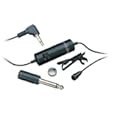 Audio-Technica ATR3350 lavalier
I usually plug this lavalier mic into my Sanyo Xacti videocamera. It’s cheap, it sounds fine, and it allows me to improve the sound of my videos. Did I mention it’s cheap (like $20 or so)? And for my Xacti anyway, it’s very easy to use – I just plug it into the viceocamera’s external mic input and forget about it – nothing else to mess with.
 Samson C01U USB Studio Condenser and the Blue Snowball
When I’m making a screencast, I usually plug one of these two mics into my laptop via a USB cable. I like the Samson better – it sounds better to my ears. Also, the Blue Snowball had an issue with Windows Vista (as in it didn’t work for me), so it hasn’t gotten as much use at work (my work laptop has Windows Vista loaded). I have used it without a hitch on my Mac laptop – it sounds great, and has a couple of different mic signal patterns that you’d use for different micing situations.
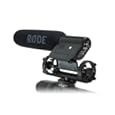
We have a semi-pro videocamera at work (the Canon GL 2). It has an ok mic built into it, but the RØDE mic is a fine shotgun mic. Plug it in, aim it at someone, and they’ll sound like they’re talking into the mic, even if you’re 10 feet away from them.
Tips on using these mics: