Last week, I focused on three questions every webpage should answer. The questions were:
Three Questions every webpage should answer, #3: Why should I care?
One more question every webpage should answer – #3: “Why should I care?”
This one comes from my library’s Executive Director, Gina Millsap. Another way to ask this question is “Why would I want to do that?” or “What’s in it for me?”
This is where your PR, marketing and promotion skills come into play. Why? Because you need to sell your content to your customers.
Selling? I hate selling – I’m a librarian, for peet’s sake!
Yep – I get that. But just putting information about something up on a website doesn’t mean people will attend that event, read that blog post, or check out that book. Sometimes we need to go a bit further, and work on convincing our customers to take those next actions I talked about in my last post.
The goal on a website is to move people from point A to point B – from reading a book review to actually checking out the book, for example. This isn’t selling as in “smarmy used-car salesman” selling … but it IS a form of selling, and a good organization learns to do this – on posters, in person, and even on our websites.
Answering “why” can be as simple as a brief explanation on why something is useful. For example – why should I apply for a library card? Because you get to read all your favorite books, and check out movies … for free! And you have already paid for it anyway (via taxes).
Look around your website, and see if you are answering the “why should I care” question. If not – rework your content so this question is answered up-front and often.
Three Questions Every Webpage Should Answer, #2: What do I do Next?
A couple days ago, we looked at the 1st question every webpage should answer: What can I do here? Today, let’s look at the 2nd question I think every webpage needs to answer: What do I do next?
This question is #2 for a reason. Question #1, What can I do here?, is pretty important – that’s the main focus of the page, after all. But once your webpage visitor has done that thing – read that article or filled in that form – they need to know what they can do next? Good webpages direct those next actions.
Here are some examples:
- When you have finished reading this blog post, you’ll get a list of related blog posts at the end of the article. Those suggestions (created via a WordPress widget) are next actions.
- In my library’s catalog (catalog.tscpl.org), if you do a search and don’t find anything, you get an Ask a Librarian chat button (assuming we’re open). “Need help? Click the Ask Us button to chat” is a next action.
- Amazon is the King of Next Actions – each page is full of the “main event” – buying the book. But there are other, alternative next actions there, too – like adding more books to your order.
Three Questions every webpage should answer, #1: What can I do here?
Ever visited a webpage, then looked around, wondering “what can I do here?”
If you have … that web designer failed!
I think every webpage should answer the question “what can I do here?” either visually, or by spelling it out:
- Visually: design in such a way that the stuff you can do on a page, like clicking a button, filling in a text box, or even just reading or watching content, is extremely noticeable. Amazon does this by using complimentary colors that “pop” out on the page. They often use blue as a header or sidebar color, but the buttons they really want you to see (ie, the “buy now” button) are orange – a complimentary color.
- Spelling it out: Use words, colors, graphics, etc to “spell it out” for people – tell or show website visitors what to do on the page. For example, we try to do this at my library’s website. The main page directs people to “Get a Library Card,” “Donate Now,” “Find Stuff,” “Ask a Librarian,” or Subscribe to our blog posts. People know what to do on our site, because we direct them.
On your library’s website, do people know “What can I do here” when they visit the main page? How about the catalog page, the “you didn’t find anything” page, or on your blog? At the comment box? On your Facebook Page even?
Think about it … and make sure to answer the question “What can I do here?”
Is the Web Modern Yet?
Today’s web is the “modern web” – css, HTML5 coming soon, websites designed with grids, lots of functionality. Yes-sirree, this is the modern web.
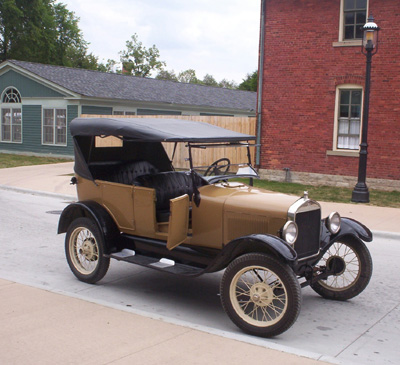
Just like this was a modern car:

This “modern car” could’t move fast enough for today’s modern highways (top speeds of 40-45 mph), wasn’t automatic, and didn’t have a/c, radio, or an iPod hookup. Or windows, for that matter. But I’m guessing that to the buyer back then, it was a pretty modern car, and a major change for them. They had to figure out the details of the change – i.e., what should we do with Bessie the horse? Where do we park it? Where do we get gas? How do we maintain it?
My point? That’s where the web is today – roughly 20 years after the first web page went online, we have today’s “modern” web. It certainly looks pretty modern to us, much like those cars from 1927 probably looked to the buyer.
Guess what? Much like that Model T … IÂ don’t think we’re done yet. With websites or with libraries.
- « Previous Page
- 1
- …
- 11
- 12
- 13
- 14
- 15
- …
- 35
- Next Page »