 People tell me they like the way I do presentations … so I thought I’d share some tips and tricks I’ve learned along the way.
Tip #1: Don’t Use Templates
Ever. They are evil. Well, ok – they’re probably not that bad. But they sure do suck the creativity out of creating a slide deck!
Generally, I start with a clean, blank slide. I remove all the text boxes, title boxes, etc. Or just pull up an actual blank slide.
For backgrounds/themes, I usually just use a simple white, black, or gradient background (though once in awhile I’ll use a fun textured background that I find somewhere – it really depends on my mood).
From there, I actually drop parts of my outline into the presenter notes part of the slide (so I still have a blank slide). Then I start figuring out what words are important enough to actually use for the slide, and decide what type of image might work best on the slide, to support the point I’m trying to make.
Then I start dropping text and images onto the slide. I usually stick with 1-2 font styles, and make heavy use of layering and shadows (so parts of the slide “pop” out at you).
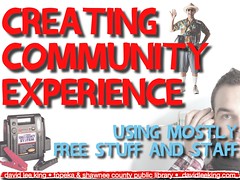
The image accompanying this blog post is the title slide to my newest presentation (giving it this Sunday at ALA Midwinter). White background, fancy font with a shadow, and some images (that relate back to the three main points of my presentation).
Simple, yet effective. And fun, too (if you like creating slide decks anyway).
Out of curiosity, what sources do you use for images in your presentations? Also, in your blog? Thanks!
I was going to ask David the same question, Erin! I love the fun funky appealing graphics David always uses.
Erin & Colleen – thanks! I generally use Flickr creative commons photos. If not that, then it’s one of my own photos, a screenshot … and once in a great while, a swiped photo off a google image search (the battery charger and the tourist in the example above came from my good friend google)
What’s your take on using “all rights reserved” images from Flickr? I’ve seen many librarians use them with the URLs on the slide. Does that make it legit? Just curious. Thanks!
Nicole – simply put, it’s stealing – if the presenter didn’t ask for permission first.
I make sure to use Flickr photos with a creative commons license, and point to the original source via a URL showing on that slide – perfectly fine that way.
That said, copyright is pretty antiquated, and is in dire need of a rewrite!
Nicole – simply put, it’s stealing – if the presenter didn’t ask for permission first.
I make sure to use Flickr photos with a creative commons license, and point to the original source via a URL showing on that slide – perfectly fine that way.
That said, copyright is pretty antiquated, and is in dire need of a rewrite!
Thanks, David!
Very true. I think some Flickr users may not be aware that All Rights Reserved is the default. But then again, why allow for downloads if the user purposely chooses to restrict usage? An interesting paradox to web 2.0.