So – anyone else stay up to nab their name on Facebook? I’m now http://www.facebook.com/davidleeking … and an admitted dork, too. But a happy dork!
The Destination Web is Morphing – Pay Attention!
 I’ve been reading and thinking about websites lately (oh really David? Who would have guessed?). Organizations simply don’t have one nice, tidy website to manage anymore. First, take a gander at these three articles:
- Google may buy twitter or not but why is twitter so hot – almost a side point, but Om mentions the decline of the destination web
- The end of the destination web era – Steve explains in a little more detail
- When Should You Stop Blogging – Kathryn Greenhill discusses why some people stop blogging
OK – read those? Good. I think these guys are on to something. Some people are finding tools that work better for them. More social tools are appearing. Take blogs, for example. Some people were just blogging for the interaction, which they were getting, in a convoluted way, from comment boxes and RSS feeds. Twitter and Facebook status updates meet those needs much better – the interaction is there, it’s easy, and they can pass on fun remarks and pass URLs back and forth easier than through blogs and comments.
But the end of the destination era, like Steve Rubel claims? I’m not so sure about that. Instead of saying “it appears the destination web era is drawing to a close,” I’d say it’s morphing. Our traditional destination websites are not as important anymore. Why? Well… assuming you’ve placed your organization in all the current social media tools that your customers use … there are now more options. Want to find out about something at the library? You can go to our website. Or our Twitter tweet. Or our Facebook event. Want to read a post? You can visit the website to do that – but that’s not the best way to read blogs. Much better to subscribe to the feed.
Blogs, YouTube, Flickr, Twitter, SlideShare … those sites are created so you don’t have to visit the actual destination page. Instead, through RSS and embedding tools, it’s really pretty easy to subscribe to the content you’re interested in. Your destination isn’t the organization’s website – your destination is your feed reader.
But I said “I’m not so sure…” The destination site is still there for some things. Want to create a YouTube account? Gotta go to YouTube. Want a new library card? Have to fill out our form … on our website. Want to buy a book at Amazon? You can certainly browse elsewhere, but when it comes time to put in your credit card number, you’re (hopefully) doing that at amazon’s actual website.
And all that is not taking one big thing into account – our customers. Yes, at my library, some of our customers tweet. Some use Facebook. But right now, anyway, probably a majority of our customers still need to visit the website to do stuff (and I’m not even mentioning those that only walk in to the physical library).
You’ve heard it many times – go where your customers are. For libraries, the majority are still on our destination websites and in our buildings. But that is definitely spreading out. Some parts of our websites were really never intended to be destinations (conversations better suited to Twitter or a forum, for example). And those parts are going where they’re better suited. But some parts ARE still destinations. Why? Because those are places you can do the stuff of the organization (checking out, signing up, buying, filling out, etc).
More Chat in the Catalog
Remember my post on TSCPL’s Meebo chat widget embedded in our library catalog? Since then, we have stopped using the Meebo Me widget. It was great – it helped us start our IM reference service, and it was easy to embed pretty much wherever we wanted. But we grew out of it!
We discovered a few shortcomings, like not being able to send hotlinks through it, and our public services staff really wanted the ability to send an IM to someone else. So now, we’re using Libraryh3lp for our IM reference service. Libraryh3lp gives us those added benefits and more.
And we’re doing a few different things with the catalog embed, too. Here’s a pic of the keyword, No Records Found search:
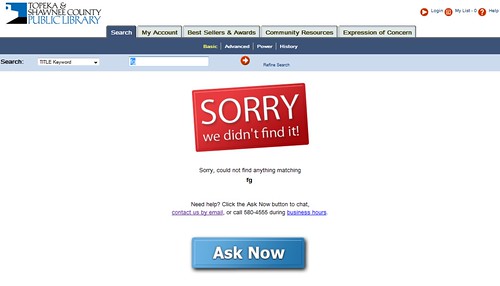
We’re trying to make instructions clear, friendly and attractive. If you click the Ask Now button, you get a tiny IM widget pop-up page. Why pop-up? With our Meebo widget, we discovered that a lot of people would start asking a question, then click something … and they’d be gone, because they had clicked away from the page with the embedded IM widget. Bumer! With our new pop-up version, that problem is solved. Users can click away all they want … and still interact with us.
But even cooler than that – Michael, our web designer (one of his many hats) discovered a way to embed a similar thing on the Search Results page:

This provides more opportunities for patrons to ask questions when they get stuck on a search – even if they’re finding things. Basically, they have access to us ON EVERY SEARCH they do.
And not just IM access – that’s provided via the Ask Now button. But we also include our phone number and a link to our email Ask a Librarian form.
We’re excited about this – should be fun to see if we get more catalog-related questions.
Making Connections – the Institutional Version
 Last post, I covered things I think about when making personal friend connections in a bunch of social networks I use. I also said “for MPOW, it’s slightly different – I might cover that in another post.” Here’s that other post.
As an institution, who should you friend? Why? This is pretty subjective of course, but here are some general guidelines to get you started:
Friend patrons/customers/members. Friend people living in your service area, or who are likely to use your services. Find them using tools like Twitter’s Find People search or any number of third party search services. Your goal is to share your stuff, your events, and yourselves with other people and organizations who can actually use and benefit your content in a social network.
If someone friends you, check them out. Look at their posts, look at their bio, and where they’re from. If they live close by, friend them. Then start sharing.
Friend other local organizations. Again, the goal is to share your stuff with other organizations that can potentially partner with you, or otherwise send people your way.
Friend others who are interested in your stuff. Have a local history collection that focuses on a certain individual or era? Friend others who are interested in the same things. This should hold true especially on social networks that focus on multimedia, like Flickr and YouTube.
Other Considerations
Facebook Groups – these can have a narrower focus, so you might be friending fewer people in a group, especially if it’s more of a niche group. For example, if you have a Facebook Group focused on teens, you’ll want to friend actual teens, rather than just anyone of any age.
YouTube – do your local news media outlets have YouTube accounts? Make sure to friend them, and favorite some of their videos.
Finally, be friend-neutral. Don’t agree with what the person says, or don’t like their content? Remind yourself that this isn’t your personal social network you’re developing, but your organization’s network. And most likely, you take all shapes and sizes of friend connections.
Further reading: my set of posts on attracting friends, starting with Don’t Friend Me.
What am I missing? Any other groups it might be good to friend? Not to friend?
photo from sausyn
Making Connections
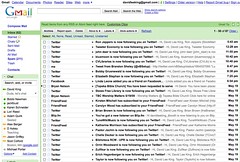 If you sign up and use social media tools, here’s what might happen to you: the image accompanying this post is my inbox. I recently visited my parents, and I only answered pressing emails … but didn’t really clear stuff out like normal.
Check out the pic – everyone wants to follow! Twitter follow requests … Facebook friend requests … blip.fm new listeners … Friendfeed subscribers … Flickr contacts … even a request to do something from church (they’re using a cool 2.0-ish tool for worship team scheduling). Probably a couple of blog comments in there, too. There were 2 pages of this.
And some of you play with this stuff more than me … I can only imagine what YOUR inbox looks like!
Who to friend? Who to ignore? Who to respond to? And when? Here’s what I do:
- Twitter: I get more of these than the others, so I’m a bit pickier here. I friend you if you sound interesting and don’t look like a spammer. I read your bio and a couple of tweets. Sometimes, I look at your follow-to-follower ratio. I usually don’t follow other libraries or people that sound too much like snakeoil salesmen (i.e, that mention SEO/make money online/I’ll make your life better stuff).
- Also picky with Flickr – I’ll follow you if I know you, if I’ve met you, or if I might meet you professionally (i.e., if you’re a librarian or a social media type).
- Facebook: I follow most people who follow me. I recently had a run of high school chums discover Facebook.
- blip.fm: If you follow me as a listener, I’ll follow you back.
- Friendfeed: Same – I follow back almost everyone who follows me.
- In any of these, if you send me a message/tweet me/write on my wall, I’ll read it and usually respond if it makes sense to do so. Sometimes I read it, think “huh” and move on – no response needed.
- Also – if I come across your blog, your book, or an interesting tweet/post, I might friend/follow you – so I can receive more interesting content from you!
When do I do this? Personally, I usually when I read it and/or when it’s convenient to do so (for MPOW, it’s slightly different – I might cover that in another post). I think of follow requests and comments/tweets/wall posts as introductions and conversation, so it makes sense to me to do it sooner rather than later. But then, I don’t have a ton of them, and find it’s simply easier to quickly deal with a follow request quickly and move on, rather than letting them pile up (unless I’m out of town or away from the web for a bit).
What do you do? Who do you friend? And when do you find the time? Stuff to think about…
- « Previous Page
- 1
- …
- 161
- 162
- 163
- 164
- 165
- …
- 328
- Next Page »