This was my session – here are my slides – enjoy! Look at the slides, and read this person’s notes, and you will get a good feel for the discussion.
Social Media Strategy & Goals
View more presentations from David King
social media | emerging trends | libraries
This was my session – here are my slides – enjoy! Look at the slides, and read this person’s notes, and you will get a good feel for the discussion.
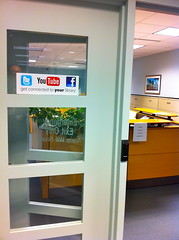
You’ve seen those “follow us on Facebook” signs at stores and restaurants, right? Or heard a radio dj mention following their radio station’s Twitter account on-air?
Guess what? Libraries can do the same thing!
As a first experiment, my library recently placed two “follow us” signs in our building – one at the main entrance to the library, and one on our administrative office doors (shown in the photo).
Why do this? Easy – it’s a relatively unobtrusive way to tell our customers that we have a social media presence, and that we want them to follow us. It’s also a way to link the physical to the digital – by promoting our digital presence (i.e., our Facebook Page) in our physical presence (i.e., our building).
Where else could we put these signs?
One thing we can improve on – Kathryn Greenhill mentioned this to me recently – when you make a sign advertising your social media presence, make sure to include a URL or at least your social media name. Otherwise, people might not be able to find you (we were talking about this particular sign)! For example, my library’s full name is Topeka & Shawnee County Public Library … but we’re simply topekalibrary on social media sites. We’ll add that on the next version of the signs.
And a funny – watch the arrangement of your icons! We almost put the Facebook icon first … until someone in our Creative Group mentioned that we were spelling “F You[tube].” Certainly not our intent to tell customers to “F You!”
Like these ideas? Come hear more on November 2 at my ALA Techsource webinar on Facebook Pages! Make sure to register!

I just read The Thank You Economy by Gary Vaynerchuk. Good read. Here’s an interesting thought I got out of it that relates to libraries.
On page 53, he writes about Nielson conducting a study on what drives consumer trust. 70% of people said they turn to family and friends for advice when making purchasing decisions.
Then Gary says this: “The ROI of your relationship with your mother is going to be much higher than that of the one you have with a good friend. Both, however, are more valuable than the one you have with an acquaintance, which trumps the relationship you have with a stranger. Without social media, you and your customer are relegated to strangers; with it, depending on your efforts, you can potentially upgrade your relationship to that of casual acquaintances, and even, in time, to friends. The power of that relationship can go so far as to convert a casual browser into a committed buyer, or a buyer into an advocate.†(pg 54-55).
This idea of turning strangers into friends works great in libraries, too. The goal is simply this – become casual acquaintances, or even friends, with our customers. We have done that for years in our buildings – I’d say that’s business as usual.
Online? We can do the same thing by using social media tools like Twitter and Facebook. Start friending people in your community. Your customers. That’s how you start turning strangers into friends … and into customers of your library.
Here’s what Gary did – he created Twitter alerts for wine words like Merlot. When someone had a question about that term, he answered it … and started growing a reputation about actually knowing something about wine.
We know stuff too – we are librarians, after all! Use a tool like Twitter. Do a zip code search for your local area or a town search … then add some words to that search, like book, reading, etc. Or business terms … or whatever the hot issues in your town happen to be.
Then start answering questions or making comments as they seem relevant. Point to your stuff, like the book that answers it, when it makes sense. Be helpful … like you already are in your building.
It’s a way to get out in the community without actually leaving the air conditioning!
Pic by Steven Rosenbaum
 Ever visited a webpage, then looked around, wondering “what can I do here?”
If you have … that web designer failed!
I think every webpage should answer the question “what can I do here?” either visually, or by spelling it out:
On your library’s website, do people know “What can I do here” when they visit the main page? How about the catalog page, the “you didn’t find anything” page, or on your blog? At the comment box? On your Facebook Page even?
Think about it … and make sure to answer the question “What can I do here?”
If your library’s like mine, you have staff-only ways to access library stuff … things like employee parking, a staff-only entrance, a back-end way to access the library catalog, etc. Whenever I put a book on hold, I get it delivered via inter-office mail.
I never have to use the library like a patron if I don’t want to!
My question – is this a good thing?
Try using your library like a patron. Is it easy or hard? Is there something that frustrates you about the whole process? It’s probably doing the same thing to your patrons.
Here’s a thought – maybe we should create a “Work Like a Patron” week, where we only use the library like our customers do – use your library’s wifi (bonus points for using a Public PC), search using the patron version of your catalog, maybe even sit at those lovely desks in the library. Or hang out in a cafe, accessing all work- and library-related stuff from outside of the building. Use the front door, and see the library through your patrons’ eyes.
This works for the IT department, too. Use library employee tools like … library employees, rather than like IT dudes and dudettes. Is it hard? If so … it’s probably hard for the rest of the library, too. Make it work for everyone!
If it works wonderfully, great! If not, maybe you have some things to improve.