On Tuesday, I gave a Designing the Digital Experience presentation at Nassau Library System in New York. It was a fun time – lots of good questions and discussion!
So … here are the slides from that talk. Enjoy!
social media | emerging trends | libraries
On Tuesday, I gave a Designing the Digital Experience presentation at Nassau Library System in New York. It was a fun time – lots of good questions and discussion!
So … here are the slides from that talk. Enjoy!
Sometimes, a blog post or article on a library website doesn’t get any comments. And that’s fine – not every post is comment-worthy, right? But there are ways to prompt, or “invite” visitors to comment … even by using the website’s built-in comment functionality. Let me show you what I mean.
Here are two examples – the first from my library’s website, and the second one from Atchison Public Library. Both of these examples are screenshots taken from the main page of both websites – each a teaser for an article.
Mine first (screenshot below):
We let the comment functionality simply announce that no one has left a comment on this post (and darn it – it’s MY post!). We do that via the text “0 Comments.” This works fine – it’s what that functionality is supposed to do.
But check this out – here’s what Atchison Public Library does (screenshot below):
See the difference? Atchison uses their lack of comments to … invite people to comment. They do this by prompting their website visitors to “be the first to comment.”
I know – it’s one of those little detail-y things. But it’s that type of detail, that focus on inviting patrons to participate, that just might prompt them … to participate. It might just convert that lurker into a more active participant.
Nothing wrong with that – good job, Atchison!
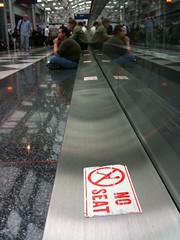
Take a look at this pic – it’s at the Chicago O’Hare International Airport Denver airport. I really don’t know the why’s behind this sticker, but I can guess. And I’d guess it goes something like this:
When the moving walkway was installed, they made these little metal ledges. Maybe the ledge houses a belt, or gears – maybe it’s just for looks. Who knows?
Either way, as the airport got busier, and delays started happening more often, customers looked around for a seat and couldn’t find one. Then they eyed that handy, seat-sized ledge – and sat.
When airport staff noticed that lots of people needed seats, and were using those handy little seat-sized ledges, what did they do? Did they install more seats? An overflow room? Restaurants with more seating? Nope. They chose to put a big fat sticker on the seat-sized ledge that reads “no seat.”
So – a question. Who do you think airport administrators were thinking of when they created that sticker and stuck it to the makeshift overflow seating area? Were they thinking of their customers, who didn’t have a place to sit? Or were they thinking of their staff? I’d guess the airport’s decision had more to do with themselves than with their paying customers with tired legs.
Moral of the story? Always put your customers first. In the airport’s case – instead of a “no seat” sticker, how about putting out cushions? Work hard to always improve your customers’ experience while using your services, even with the seemingly innocuous things (like little seat-sized metal ledges).
Your customers will remember it and you will be a hero.
Update – Chuck Cannon, Director of Public Affairs at Denver International Airport pointed out that I had the wrong airport. Sorry! Just updated the post.
Last summer while at ALA’s annual conference in the Chicago area, a couple friends and I were eating lunch at the Corner Bakery Cafe and saw this ad on one of the tables.
The interesting thing about the ad wasn’t so much the content itself (though I’m sure it’s good stuff). We got all geeked out over the URL associated with the ad. Why? Because they didn’t point to their website.
Instead, they pointed directly to their Facebook Page.
Think about that for a sec, because there are some pretty large implications for library web services. I know that many of us have worked for years to centralize all our websites, tools, and services into one place – preferably at www.mylibrarysnamegoeshere.org …. some of us have worked hard to get federated search tools to work on that library website, and have even integrated some of our library catalog content into our websites, as well.
But people aren’t visiting our websites (well, not in droves, anyway). They are going to other places, like Facebook (and YouTube, and Google, and …). And of course we should be active in some of those social sites. But what about pointing directly to those social sites … in an ad? That’s taking it one step further, isn’t it? Pointing directly AWAY from our website … to some social tool like Facebook?
This could work for libraries. If you have a Facebook Page, check out your Page demographics (Facebook provides some basic stats on Facebook Page visitors). Who’s your main audience in Facebook? Doing anything for that group of patrons already?
If so, you might think of taking it one step further, and pointing them directly to the Facebook Page. Why?
But even better – for us sneaky librarians, it’s also a direct connection to a segment of our customers. But not just any customers – these customers already use Facebook and actually LIKE to interact. If they have become a fan of your library, that means they like to interact – with the library.
So don’t be shy! Spread out your nets – decentralize those web services. Send out status updates. Ask questions. Start discussions. Get feedback about new services. And in the process, have fun interacting with a group that actually WANTS to interact.
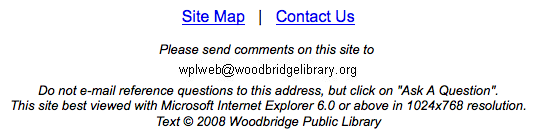
Ever seen a library website that had many of the “normal things” in place, like the library catalog, a handy database link, and an easy way to ask questions … but the people in charge of the site had obviously forgotten to update some of the “little details?”
Here’s what I mean – take a peek at these two screenshots. Here’s the first one:
The “site best viewed with…” statement has a problem or two. First of all, it’s simply not true – I was viewing it FINE using Firefox on a much larger resolution.
Secondly (if the statement’s true), it makes “visiting the library” much harder for a pretty significant chunk of people. For example, at my library’s website, 68% of our web visitors use some form of IE – but that’s most likely weighted, since our 177 public PCs have IE installed, and everyone hits our website upon opening the browser. On my blog, only about 30% of you are using IE… again most likely skewed a bit, since y’all are amazing people who know your stuff (and like to use Chrome, Safari, Firefox, etc, etc, etc).
My point? If you design for one browser, you are in essence making the digital library visit harder for 30-50% of your customers. Would you do that with your physical library? Like make all the doorways 5ft 8 in high, so anyone taller than that would either have to stoop to go through (or would bump their heads) … and then put up signs that say “Library Best Entered by people under 5′ 8″ tall?” I’m guessing not.
[And one other tiny little thing here – if you don’t want people to email reference questions to the web email address… don’t put the address on the page. Just funnel everything through the large “Contact Us” link, and call it good.]
And one more very similar problem (sorry for the tiny text! Click the pic to see a larger version):
Same stuff, but worse:
I’m guessing the main problem is that the footer has been ignored for at least 3 years, probably longer.
Why bring this up? It’s probably a good idea to check on those little hidden details of your website every so often. Do they still make sense? Does it still hold true? Is it even necessary? Think about it … and edit as needed.