We recently purchased a GoPro camera, and have been experimenting with it. One of my clever colleagues put the camera on the roof of our library, and created a pretty cool time lapse video.
Enjoy!
social media | emerging trends | libraries
We recently purchased a GoPro camera, and have been experimenting with it. One of my clever colleagues put the camera on the roof of our library, and created a pretty cool time lapse video.
Enjoy!
Are you familiar with Vine? It’s an iPhone and Android video app that makes 6-second videos. With Vine, you can watch videos, follow other Vine video makers, and easily share your videos on other social networks like Twitter (Twitter owns Vine).
And … Vine is one of a handful of new, popular, visual social tools. Others in this category would include Instagram and Snapchat.
Vine has the potential to be a really powerful and fun medium when used well! So – first, go watch a bunch of Vine videos to get a feel for what can be accomplished. Done? OK. Now, let’s talk about using it well.
Here are 12 tips (that’s like 2 tips a second in Vine mode!) for making better Vine Videos:
Useful Vine Video links:
Finally – follow me on Vine! I’m davidleeking on Vine.
Why can’t annual reports be cool? Or at least interesting enough to actually read, watch, etc?
That’s what my library tries to do with ours, anyway. For the last two years, our annual report has been video-only. This year, we improved upon that a bit, and did three things:
Here’s our 2011 annual report, for those interested.
Why do this?
We have to create some type of annual report each year. And honestly … people mostly DON’T look at these. Sure, you can mail them to everyone. Print them out and place them in strategic locations in the library. Send them to parter organizations in your community.
But read them? Maybe some people will give it a cursory glance … and them toss it into the trash, like a greeting card.
With our video? There’s enough eye candy there for people to watch, and maybe learn something more about their library, and what their tax dollars are actually going to.
That’s the idea, anyway!
 [This is an article I wrote for my book, Face2Face – I thought it would make a great post here, too – enjoy! DLK]
Social media has been around for over ten years. My guess is that by now, your organization is probably involved in some way with social media. Maybe you have created a Twitter or Facebook account. Maybe you even have some friends and fans on those accounts, and you share things with them when you have time.
Let’s rework this in 2013. Social media is now mainstream, and your customers are using it to connect. They connect easily to each other, and since the tool is the same, they’ll find it easy to connect to your organization, too… if you make a few easy-to-do adjustments in your approach to business-facing social media.
Here are five simple adjustments you can make to kick-start your organization’s social media efforts in 2013:
1. Focus on Conversations
First off, let’s focus on conversations. Many organizations and businesses have been using social media status updates as a broadcasting tool. They send out notices of events, sales, or coupons. Possibly, they have used social media as an easy outlet to send out press releases and important corporate announcements.
 Guess what? If your organization focuses primarily on sending out corporate communications, your customers will tune out your organization and unfriend you in a heartbeat. In 2013, instead of using social media as a one-way broadcast tool, work on starting and continuing conversations with your customers.
This will require your organization to do three important things: 1. Listen before you speak. Set up some listening tools (Google alerts and Twitter search alerts are good places to start) to see what your customers are saying about you; 2. Respond, using colloquial, conversational language. This will feel weird if you’re used to more formal marketing-speak. Make it feel like you’re talking to a work colleague at the water cooler – do this, and people will start talking to you. And 3 – figure out what types of conversations YOU want to start. Do some brainstorming on the conversations your organization needs to hear in 2013, and start those conversations.
2. Focus on the Visual
For the most part, many businesses and organizations have been posting text-heavy status updates in their social media accounts. That makes sense in text-based Twitter, but not so much in Facebook. In fact, Facebook best practices show that when you do one simple thing – add a photo or a video to your post – engagement increases by 100% or more.
So get those cameras out of your pockets (yes, that iPhone or Android smartphone makes a great point-and-shoot camera), and start taking photos around the office, the warehouse, or the store. Maybe think about the three most important things that your customers should know about your organization, take photos of that, then share those photos with customers.
3. Focus on Video
That smartphone I just mentioned in #2 is also HD quality video recorder, and we can put it to good use! There’s a reason YouTube is so popular right now – people love watching short videos. Studies show that people engage more with video posts than with text-only posts.
Here’s my guess – most likely, you haven’t made many videos for your organization. If you have created some videos, it probably resembled a TV commercial. That’s not what your customers want to watch. Instead, get to the point immediately – YouTube suggests that the first 15 seconds are critical to connect with viewers. So don’t waste those seconds with titles, fade-ins, and credits.
Just start sharing your main points. Then post that video to two places – YouTube and Facebook. Use YouTube to share in most places, and use the Facebook upload to share with your Facebook page fans. Facebook’s algorithm favors videos uploaded to Facebook, so those will get seen more than a shared YouTube video.
4. Focus on Next Steps
Many times organizations post information to their social media accounts, but don’t include anything for customers to do. They don’t include a next step. Let’s change that in 2013. Make sure that everything you do includes some type of “ask.†That ask can be as simple as asking customers to “friend or fan†a Facebook Page, or the ask might be to click a link that takes them to a new product or a buy-it-now page.
More people will click if you actually ask them to click. Because of this, make sure to provide customers with some next steps, and actually invite them to take that next step. Do that, and your organization will be one step closer to continued engagement with customers.
5. Focus on your Customers!
Finally, most businesses and organizations, believe it or not, don’t actually focus on their customers! Instead, they focus on their stuff, on their showroom floor, or on their sales staff. In 2013, let’s focus on our customers. Engage them in conversation. Ask them if they like what they’re seeing. Ask them to take next steps, and invite them into your organization.
Follow these five simple reshaping steps, and you will be well on your way to having a great 2013 with social media, and with some really engaged customers, too.
pic by Tintin44
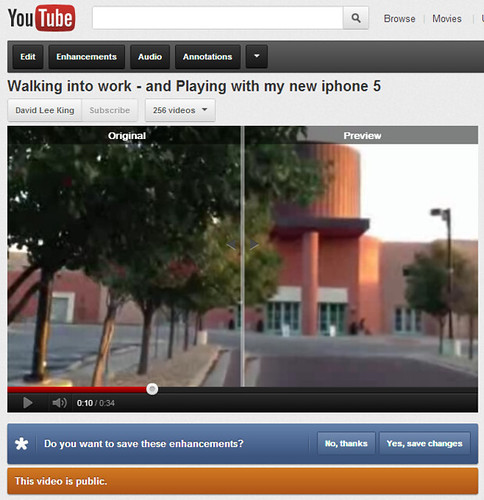
Here’s a cool new feature I just discovered in Youtube. I posted a short, really bouncy video (bouncy because I walk sorta bouncy). The video’s nothing fancy – really just me, playing with my new iPhone 5.
Youtube noticed the bounciness of the video, and automatically offered to “fix it.” And it did an ok job, too! Now the video looks really smooth (odd, since I’m talking about how bouncy I walk in the video), and there are some weird jerks as the automatic setting either gets a bit confused or is “catching up” to me. So be warned – your mileage may vary!
Below is a screenshot of what it looks like mid-fix. You basically get a split screen to see if the video looks better, and a Yes or No button for saving the video.
Simple stuff, but sorta cool and potentially handy, too. Check it out!